
Basics
Assist Manager — a player support tool designed to make gameplay more convenient by automating a limited set of actions.
The main purposes of Assist Manager are:
- Simplifying monster hunting
- Managing party buffs for support classes
- Allowing players to step away from the computer for a short time without losing their character's place in the party
The Assist Manager has intentionally limited functionality and is not designed for full-AFK farming.
Due to its built-in technical limitations, the Assist Manager cannot be configured to function as a fully automated clicker. In addition, it automatically deactivates if your character enters PvP combat as a result of another player's actions.
The system is intended to give players the opportunity to step away from their computer without letting their party down during grinding, or, for example, to perform a few basic actions on a secondary character.
Please note!
Clickers, bots, macros, and any other forms of gameplay automation are strictly prohibited.
The use of third-party tools may result in a permanent account suspension.
For more information, please refer to the E Global Rules article.
Assist Manager
You can open the Assist Manager control window in two ways:
-
Click the dedicated icon on the bottom action bar

- Select the corresponding option from the settings menu (Alt + X)
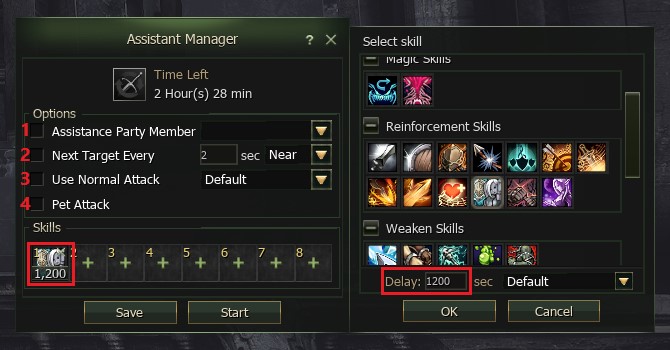
To use the Assistant Manager, select the necessary settings and set skills for automatic use:
- For a group member assist, check the box and select the character from the drop-down list
- For independent target selection, specify after how many seconds to change the target and specify the target type in the drop-down menu — close or distant
- To use the main attack, check the box and select the attack type from the drop-down menu — normal or stand
- Check this box to have your pet/summon participate in battle with you
To add a skill to automatic use, follow next steps::
- Press plus in one of the skill slots
- Select the required skill from the list
- Specify how often to use the skill in seconds
- Choose how to use the skill — normal or stand
- Click OK to save the skill settings
There are 8 available skill slots. You can configure each skill at any time. To edit a skill, click its slot. To remove a skill, click the "Cross" in the upper-right corner of the slot.
Once you have configured all the desired settings, click the "Start" button to activate the Assist Manager.
To modify the Assist Manager settings, you must first stop the automatic use of skills and auto-attacks.
Limitations
Assist Manager has several limitations:
- Available from character level 10
- Characters using Assist Manager are surrounded by a visual effect
- Does not function while character flagged or PK
- Attacking another player immediately disables Assist Manager
- The "Attack Monsters Only" combat mode is unavailable while using Assist Manager
Time limit:
- Usage time is strictly limited
- The Assist Manager timer resets daily at 06:30 server time
- The time limit applies to the entire account. Different characters within the same account share a common timer.
| Conditions | Bonus | Total Time |
|---|---|---|
| No bonus | 0 | 150 min. (2.5 hours) |
| Premium Account | 30 min. | 180 min. (3 hours) |


 Pona: Jewelry Upgrade
 Ingame calendar
 Achievements
 Clan Academy
 MasterWork Club
 Premium Account VIP
 Vitality System
 Autoloot Agathions MasterWork
 Slots expansion and weight limit
 Useful additions to the interface and game
 Pets: Wolf and Fenrir
 Quests for 1, 2 and 3 classes
 Beginner's path 1-40 level
 Library: Books of Exp
 Pets: Kookaburra, Cougar, Buffalo
 Training Olympiad
 Cyclic Macros and Assist Manager
 Missions
 Starter quest Eternal
 PvP enhance
 Attribute System
 No More Soup For You
 Tattoo Guide
 Exp Boost Guide
 Ng/D Equipment upgrade
 Lu4: Quests in Starter Zones (1-19)
 New SA effects
 Правила E-Global
 New S-Grade Sets Bonuses
 Masterwork Item Bonuses
 Squads Passive Skills
 Clan Active Skills
 Compound of belts
 MasterWork Olympiad
 Dual daggers and blunts
 Territory Wars
  Judicator - main class. Quest Seeds of Chaos 76+
 Hellbound: Epidos
 Instance-boss Core 78+
 Instance-boss Orfen 78+
 Pets: new skins
 Instance-boss Queen Ant 80+
 Life Stones on Masterwork
 Instance-boss Trasken 83+
 Crafting cost changes (season 2024)
 Mid Company on Masterwork
 Summoner's Transformations
 Fortresses on Masterwork
 Game event: Hot spot
 Masterwork Weapon Bonuses